Installeer de app
Hoe installeer je de app op iOS
Volg de onderstaande video om te zien hoe je onze site als web-app op je startscherm installeert.
Opmerking: Deze functie is mogelijk niet beschikbaar in sommige browsers.
Je gebruikt een verouderde webbrowser. Het kan mogelijk deze of andere websites niet correct weergeven.
Het is raadzaam om je webbrowser te upgraden of een browser zoals Microsoft Edge of Google Chrome te gebruiken.
Het is raadzaam om je webbrowser te upgraden of een browser zoals Microsoft Edge of Google Chrome te gebruiken.
Archief - PlayStation Home
Het archief is een bevroren moment uit een vorige versie van dit forum, met andere regels en andere bazen. Deze posts weerspiegelen op geen enkele manier onze huidige ideeën, waarden of wereldbeelden en zijn op sommige plaatsen gecensureerd wegens ontoelaatbaar. Veel zijn in een andere tijdsgeest gemaakt, al dan niet ironisch - zoals in het ironische subforum Off-Topic - en zouden op dit moment niet meer gepost (mogen) worden. Toch bieden we dit archief nog graag aan als informatiedatabank en naslagwerk. Lees er hier meer over of start een gesprek met anderen.
MegaMentor
Legacy Member
cram zei:Hoe kun je al die dingen doen?Heb nu heel home afgezocht maar vind nergens openingen om bij die plaatsen te komen.
Ge moet via uw map da doen. Heel precies hoe weetk ni meer, lang geleden dat da hier nog heeft op gestaan

spikie
Legacy Member
cram zei:Hoe kun je al die dingen doen?Heb nu heel home afgezocht maar vind nergens openingen om bij die plaatsen te komen.
via het menu kunt ge de kaart openen en daar u bestemming selecteren

cram
Legacy Member
spikie zei:via het menu kunt ge de kaart openen en daar u bestemming selecteren
Gevonden.
Als ge 1ne ziet rondlopen in een wolvenpakse genaamd craMslaaC da zenne kik.

Goldrusher
Legacy Member
Enkele nieuwe spaces, o.a. een nieuwe van MotorStorm...
PlayStation Home: MotorStorm Carrier, Plus Loco Island And Mui Mui Ship! – PlayStation.Blog.Europe
Hinted at a few months back in the MotorStorm Sphere, the new MotorStorm space is a decommissioned aircraft Carrier. Bought by a wealthy, anonymous, rock star and donated to MotorStorm, the spaces comes complete with a number of mini-games, quests and funky rewards.
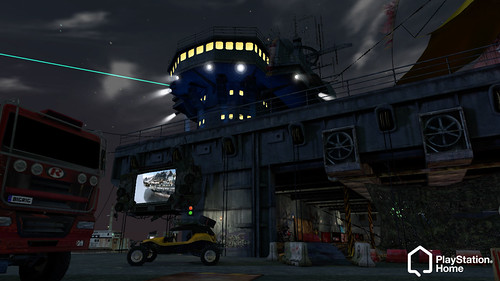
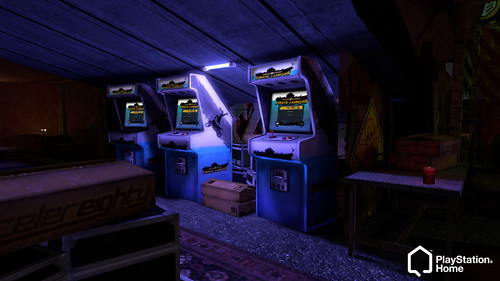
PlayStation Home: MotorStorm Carrier, Plus Loco Island And Mui Mui Ship! – PlayStation.Blog.Europe
Goldrusher
Legacy Member
Patch 1.35 vol nieuwigheden en fixes...
New features
* Home Navigator
o The Home Navigator is a new feature that replaces the World Map.
o The first thing you will see on the Navigator is a message of the day.
o The main interface of the Home Navigator has a variety of categories containing all of the different spaces you can visit and methods for getting there.
o Featured spaces
+ This is a regularly changing selection of new and exciting spaces for you to check out.
o Home spaces
+ All of the well known core Home spaces.
o Personal spaces
+ All of the Personal Spaces that you currently own and the Clubs that you belong to.
o Favourites
+ An area to view and manage your favourite spaces.
+ In any other area of the Navigator pressing [SQUARE] adds the currently selected space to your favourites.
+ There is a maximum limit of 20 favourites.
o Friends
+ A list of your friends who are currently in Home, and where they are located.
# This also includes a head shot picture of what their avatar looks like so you can easily recognise them.
+ If they are in a public space you can go to them.
+ If they are in their own Personal Space you can “knock on the door” and ask to come in.
o Explore
+ The place to browse all of the spaces in Home much like the original World Map
+ One thing to remember: when using the Navigator, you can press [SQUARE] to add the space you currently have selected as one of your favourites. When are you inside the Favourites category, however, pressing [SQUARE] will remove the selected space from your favourites list.
* Front end
o The way you log on to Home through the front end has been changed.
o Once Home has been launched from the XMB there is no need to press any more buttons to log on.
+ The HDD warning message is displayed but no longer requires a button press to confirm.
+ There is no longer a screen requiring a button press to “log on”. Connection to the PSN happens automatically.
+ If this is the first time you have logged on to Home then you will still have to initially accept the terms of service.
o Once Home is running you are taken directly to the Home Navigator without loading into any other space first.
o From the Home Navigator you can choose exactly where you want to go.
o A lot of the network communication and validation now happens in the background while you are using the Navigator.
Improvements
* The time it takes to log on has been improved quite a lot.
* Relocating between spaces has had many improvements and is a lot quicker.
* There is a new section for “Rewards” on the Menu Pad that contains all of the rewards you have been granted in Home.
* We have made several improvements to the loading bar.
* We have increased the frequency of updates about where someone is in Home so that “invite” and “go to” should be more accurate now.
* Targeting in general has been improved so it should be easier to target various objects of interest to you.
* Furniture
o If you place a new item of furniture into a Personal Space with a lot of other furniture already in place it won’t collide with anything until it is in the clear.
+ This will make it easier to add furniture to intricate furniture layouts without knocking anything over.
+ It should also help when placing large items of furniture in your Personal Space.
o Reduced the wobble that items of furniture could experience when being placed close together.
o Generally tweaked the physics on furniture items to make them react to each other in a less violent way.
Changes
* The position in the world that you listen to sounds from has been changed and should now consistently be the avatar rather than the camera.
* It is no longer possible to sit down while playing the standing up animation. You must wait for your avatar to completely stand up first.
* It is once again possible to enter a store while playing a mini-game.
* If a portable object that takes over the camera is activated while viewing a poster in full screen mode you stop viewing the poster.
* The inventory section of the Menu Pad is no longer available while sitting down to avoid problems with certain portables being activated in that situation.
* Some of the pop-up colours have been changed slightly to improve legibility in all of the different places they are used. In addition “Yellow” has been replaced with a “Fiery Orange.”
* Changed the phrasing of the legend on the furniture removal menu to make it less ambiguous.
Bug fixes
* Fixed a bug that would let you join a mini-game while a portable item was out.
* Fixed a bug that would allow you to interact with a portable item while inside the wardrobe.
* Fixed a bug that in some circumstances could stop the sound settings from being saved after you change them.
* Fixed a bug that could cause problems while launching Home if your HDD was completely full.
* Fixed a bug that could cause the furniture in a Clubhouse to vanish for some people when the club leader entered.
* Fixed a bug that could occur when previewing male or female clothes in a store without having set up a male or female avatar.
* Fixed a bug that could cause the download queue to stall when attempting to download certain scenes.
* Fixed a bug that would allow PSN notification messages to be captured in pictures when using the camera.
* Fixed a bug that was causing pictures taken with the camera on standard definition televisions to be the wrong aspect ratio.
* Fixed a bug that would cause a crash when relocating via the Home Safe Screen with a portable item out while in the wardrobe.
* Fixed a bug in the store that would cause the “Add to basket” button to become permanently unavailable if you pressed Cancel before the item fully loaded.
* Fixed a bug that was allowing people to join multiple queues at the same time.
* Fixed a bug that would cause the Menu Pad of one person to become unavailable if two people attempted to sit on the same seat at the same time.
* Fixed a bug that could cause a crash when lots of items of furniture are colliding with one another.
* Fixed a bug that could cause a crash when loading items in a space.
* Fixed various bugs within the Pool and Bowling mini-games.
* Home Navigator
o The Home Navigator is a new feature that replaces the World Map.
o The first thing you will see on the Navigator is a message of the day.
o The main interface of the Home Navigator has a variety of categories containing all of the different spaces you can visit and methods for getting there.
o Featured spaces
+ This is a regularly changing selection of new and exciting spaces for you to check out.
o Home spaces
+ All of the well known core Home spaces.
o Personal spaces
+ All of the Personal Spaces that you currently own and the Clubs that you belong to.
o Favourites
+ An area to view and manage your favourite spaces.
+ In any other area of the Navigator pressing [SQUARE] adds the currently selected space to your favourites.
+ There is a maximum limit of 20 favourites.
o Friends
+ A list of your friends who are currently in Home, and where they are located.
# This also includes a head shot picture of what their avatar looks like so you can easily recognise them.
+ If they are in a public space you can go to them.
+ If they are in their own Personal Space you can “knock on the door” and ask to come in.
o Explore
+ The place to browse all of the spaces in Home much like the original World Map
+ One thing to remember: when using the Navigator, you can press [SQUARE] to add the space you currently have selected as one of your favourites. When are you inside the Favourites category, however, pressing [SQUARE] will remove the selected space from your favourites list.
* Front end
o The way you log on to Home through the front end has been changed.
o Once Home has been launched from the XMB there is no need to press any more buttons to log on.
+ The HDD warning message is displayed but no longer requires a button press to confirm.
+ There is no longer a screen requiring a button press to “log on”. Connection to the PSN happens automatically.
+ If this is the first time you have logged on to Home then you will still have to initially accept the terms of service.
o Once Home is running you are taken directly to the Home Navigator without loading into any other space first.
o From the Home Navigator you can choose exactly where you want to go.
o A lot of the network communication and validation now happens in the background while you are using the Navigator.
Improvements
* The time it takes to log on has been improved quite a lot.
* Relocating between spaces has had many improvements and is a lot quicker.
* There is a new section for “Rewards” on the Menu Pad that contains all of the rewards you have been granted in Home.
* We have made several improvements to the loading bar.
* We have increased the frequency of updates about where someone is in Home so that “invite” and “go to” should be more accurate now.
* Targeting in general has been improved so it should be easier to target various objects of interest to you.
* Furniture
o If you place a new item of furniture into a Personal Space with a lot of other furniture already in place it won’t collide with anything until it is in the clear.
+ This will make it easier to add furniture to intricate furniture layouts without knocking anything over.
+ It should also help when placing large items of furniture in your Personal Space.
o Reduced the wobble that items of furniture could experience when being placed close together.
o Generally tweaked the physics on furniture items to make them react to each other in a less violent way.
Changes
* The position in the world that you listen to sounds from has been changed and should now consistently be the avatar rather than the camera.
* It is no longer possible to sit down while playing the standing up animation. You must wait for your avatar to completely stand up first.
* It is once again possible to enter a store while playing a mini-game.
* If a portable object that takes over the camera is activated while viewing a poster in full screen mode you stop viewing the poster.
* The inventory section of the Menu Pad is no longer available while sitting down to avoid problems with certain portables being activated in that situation.
* Some of the pop-up colours have been changed slightly to improve legibility in all of the different places they are used. In addition “Yellow” has been replaced with a “Fiery Orange.”
* Changed the phrasing of the legend on the furniture removal menu to make it less ambiguous.
Bug fixes
* Fixed a bug that would let you join a mini-game while a portable item was out.
* Fixed a bug that would allow you to interact with a portable item while inside the wardrobe.
* Fixed a bug that in some circumstances could stop the sound settings from being saved after you change them.
* Fixed a bug that could cause problems while launching Home if your HDD was completely full.
* Fixed a bug that could cause the furniture in a Clubhouse to vanish for some people when the club leader entered.
* Fixed a bug that could occur when previewing male or female clothes in a store without having set up a male or female avatar.
* Fixed a bug that could cause the download queue to stall when attempting to download certain scenes.
* Fixed a bug that would allow PSN notification messages to be captured in pictures when using the camera.
* Fixed a bug that was causing pictures taken with the camera on standard definition televisions to be the wrong aspect ratio.
* Fixed a bug that would cause a crash when relocating via the Home Safe Screen with a portable item out while in the wardrobe.
* Fixed a bug in the store that would cause the “Add to basket” button to become permanently unavailable if you pressed Cancel before the item fully loaded.
* Fixed a bug that was allowing people to join multiple queues at the same time.
* Fixed a bug that would cause the Menu Pad of one person to become unavailable if two people attempted to sit on the same seat at the same time.
* Fixed a bug that could cause a crash when lots of items of furniture are colliding with one another.
* Fixed a bug that could cause a crash when loading items in a space.
* Fixed various bugs within the Pool and Bowling mini-games.
Tuninboy
Legacy Member
hot stuff zei:Ik ben daar 2 keer opgeweest. En zin war rap over -> ik snap niet bv om te poolen : moet je meer als 30 min wachten
Het is zo dood als iets nu.
Probleem is, "alles is betalend" bijna & te lange laadtijden voor alles, als dat niet was, zat er meer volk op.
Hot stuff, pm uwe naam is. Mss kenk u, aangezien we allebei in Heusden wonen.
Texans
Legacy Member
Ik heb een summerhouse en verschillende items gekocht via de store.
Hoe kan ik mijn summerhouse ermee inrichten?
Kan je ook je trofees erin zetten?
Heb resistence 2 even gespeeld.
't Is nederlands gesproken.
Kan ik dat instellen dat het engels gesproken is met nederlandse ondertitels of enkel engels?
Jullie mogen mij ook toevoegen.
Mijn gamlertag: texangator
Hoe kan ik mijn summerhouse ermee inrichten?
Kan je ook je trofees erin zetten?
Heb resistence 2 even gespeeld.
't Is nederlands gesproken.
Kan ik dat instellen dat het engels gesproken is met nederlandse ondertitels of enkel engels?
Jullie mogen mij ook toevoegen.
Mijn gamlertag: texangator
Goldrusher
Legacy Member
Siren space eindelijk in de Europese Home:
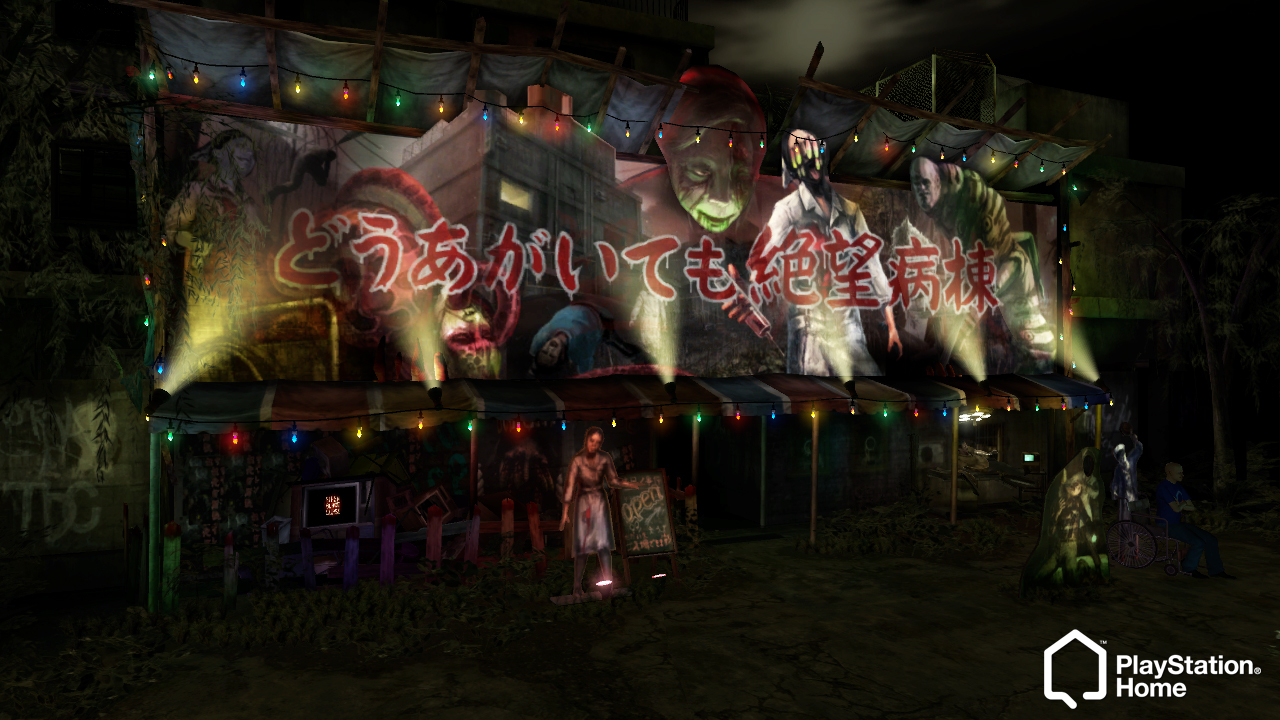
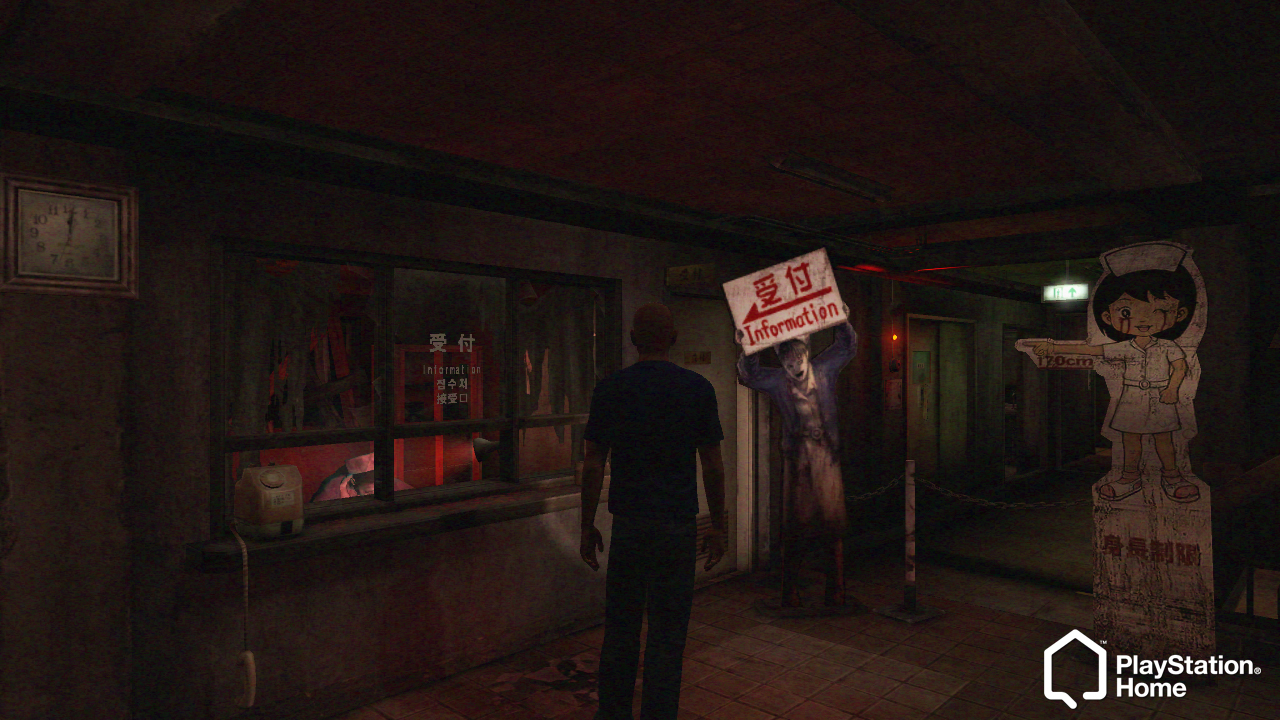
PlayStation Home: Star Wars, Ghostbusters Firehouse, Monty Python and more! – PlayStation.Blog.Europe
When you first step into this space you’ll find yourself in a rundown forest outside the entrance to the Ward of Despair. Step through the entrance to the Ward and you’ll enter the mini-game lobby. Here you’ll find video screens and places to sit while preparing to take on the Ward of Despair mini-game. When ready, talk to the receptionist and you’ll be taken into the Ward.
The Ward of Despair is playable by up to 5 players and is a recreation of the Saiga Hospital stage. Each player will be given a set of objectives that must be completed within a 5 minute time limit. Beware of the Shibito; get caught by one, and it will be game over! Complete all objectives within the time limit to earn yourself costume rewards.
PlayStation Home: Star Wars, Ghostbusters Firehouse, Monty Python and more! – PlayStation.Blog.Europe


Het archief is een bevroren moment uit een vorige versie van dit forum, met andere regels en andere bazen. Deze posts weerspiegelen op geen enkele manier onze huidige ideeën, waarden of wereldbeelden en zijn op sommige plaatsen gecensureerd wegens ontoelaatbaar. Veel zijn in een andere tijdsgeest gemaakt, al dan niet ironisch - zoals in het ironische subforum Off-Topic - en zouden op dit moment niet meer gepost (mogen) worden. Toch bieden we dit archief nog graag aan als informatiedatabank en naslagwerk. Lees er hier meer over of start een gesprek met anderen.